
Table of Contents
Programmable Logic Controller (PLC) is the industrial computer that continuously monitor the input mode and control through the customized program. It has CPU, Power supply unit, I/O modules.The CPU process the input signals according to the customized program and provides the signal to output modules. It is widely used in the Industrial automation.In this session, We are going to discuss on How to read the Excel file in Plc using C# application. We used MX-Component for the communication between PLC and Our application.
Used hardware devices
- Mitsubishi PLC (Q03UDE)
- PC
- Router
- Mitsubishi GOT 1000
- LAN cables
Used software
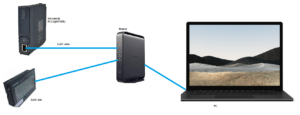
Fig :- Hardware Connection
Connect the hardware as shown in Figure. Mitsubishi PLC and GOT are connected to PC through the Router.We have to do the IP configuration to communicate the PC and PLC.
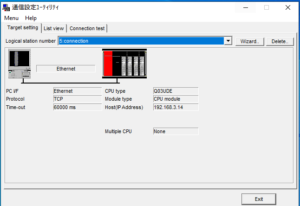
Design Application In C#
We design the application for communication, we have to use ActUtlTypeLib library file which help to communicate the PLC and PC with the help of Loguical station number which is defined in Mx-Component.







1 Comments
Leave a Comment