
Table of Contents
Application user interface (API) is the way for two software components to communicate each other using a set of definations and Protocals .
Introduction
API is like a messenger that helps different apps or systems talk to each other and work together smoothly. APIs define how software components can interact, allowing them to share data and perform tasks without needing to know the intricate details of each other’s operations. They make it easier for developers to build powerful applications by providing a standardized way to access the functionality of other software services or platforms.
ChatGPT API
The OpenAI API provides a simple interface for developers to create an intelligence layer in their applications, powered by OpenAI’s state of the art models. The Chat Completions endpoint powers ChatGPT and provides a simple way to take text as input and use a model like GPT-4 to generate an output.
OpenAI API can be applied to virtually any task. they offer a range of models with different capabilities and price points.
Pricing of APIs
Although ChatGPT’s API can be used for free on a trial basis, it is a paid API.
GPT-4 Turbo price
| Model | Input | Output |
| gpt-4-0125-preview | $10.00 / 1M tokens | $30.00 / 1M tokens |
| gpt-4-1106-preview | $10.00 / 1M tokens | $30.00 / 1M tokens |
| gpt-4-1106-vision-preview | $10.00 / 1M tokens | $30.00 / 1M tokens |
GPT-4 price
| Model | Input | Output |
| gpt-4 | $30.00 / 1M tokens | $60.00 / 1M tokens |
| gpt-4-32k | $60.00 / 1M tokens | $120.00 / 1M tokens |
Click here to the official price list from OpenAI
How to use the chatGPT API in C# application
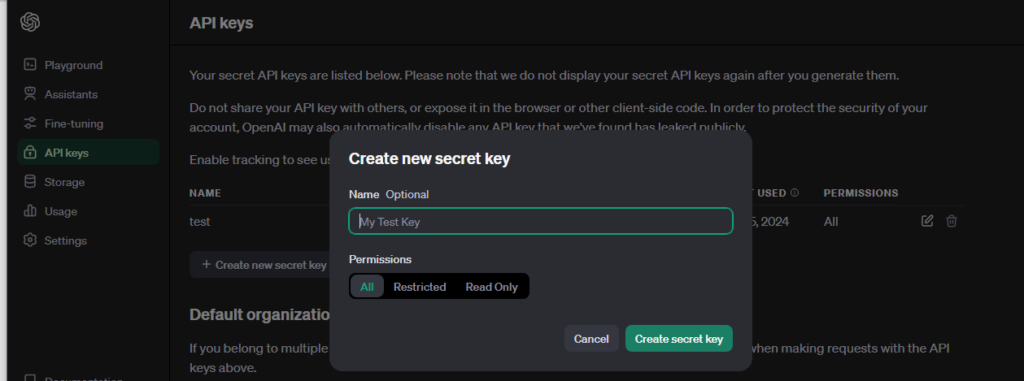
Step 1. First of all we need to create our API from the here
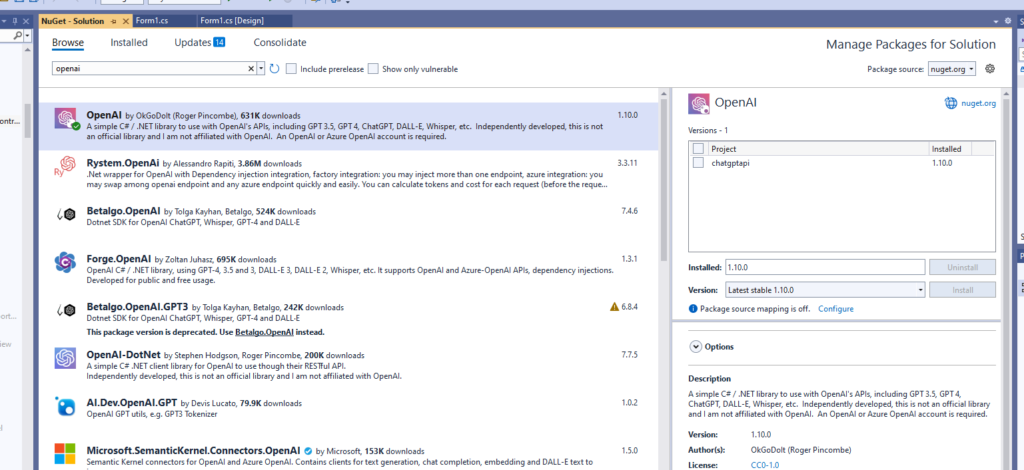
Step 2. Open visual studio and install the OpenAI library file from Tools >> NuGet Packet Manager>>Manage NuGet packet for solution
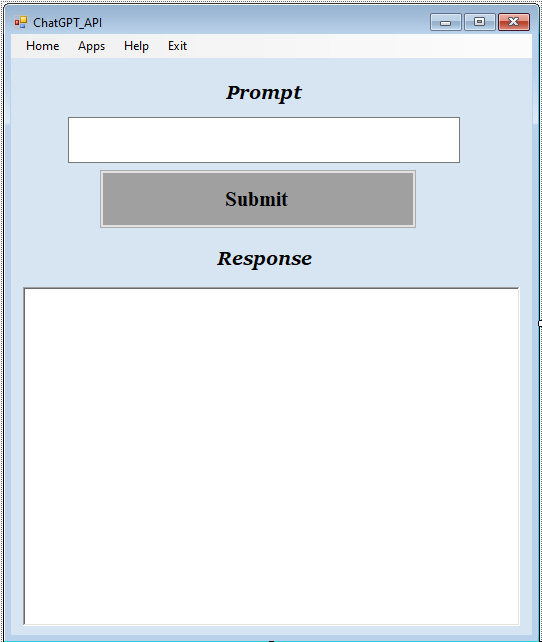
Step 3. Add textbox,button and Richtextbox on the Form
Step 4. Code
  private async Task ChatGptAsync()
  {
      try
      {
          var chat = api.Chat.CreateConversation();

          // Send user input to ChatGPT
          chat.AppendUserInput(textBox1.Text);

          // Receive response from ChatGPT
          string response = await chat.GetResponseFromChatbotAsync();

          // Update UI with response
          UpdateResponse(response);
      }
      catch (Exception ex)
      {
          MessageBox.Show("Error occurred: " + ex.Message, "Error", MessageBoxButtons.OK, MessageBoxIcon.Error);
      }
  }
Button1 click_event
 private async void button1_Click(object sender, EventArgs e)
 {
     await Task.Run(async () => await ChatGptAsync());
 }
Update_Response
  private void UpdateResponse(string response)
  {
      if (richTextBox1.InvokeRequired)
      {
          richTextBox1.Invoke((MethodInvoker)delegate
          {
              UpdateResponse(response);
          });
      }
      else
      {
          richTextBox1.Text = response;
      }
  }
Demo Video


0 Comments
Be the first to comment!
Leave a Comment