Table of Contents
In this project you will create a webpage controlled LEDs using ESP8266. Two mcp23017 are also integrated in this project to enhance the input and output pins from where you can control extra 32 devices using 32 I/O ports of two mcp23017.

Component used in this project.
- Wemos D1 mini-lite
- Two- mcp23017
- LEDs and resistors
- Jumper wires
- Breadboard
For this project you need to download the ESPwifi library and mcp23017 library.
- download the ESPwifi library
- download mcp23017 library
As, we are going to use two I2C modules i.e. mcp23017 which has a default address 0*20. So, we need to change the address of one mcp23017 by varying the address pins. click here to know more about interfacing the multiple mcp23017 with arduino.
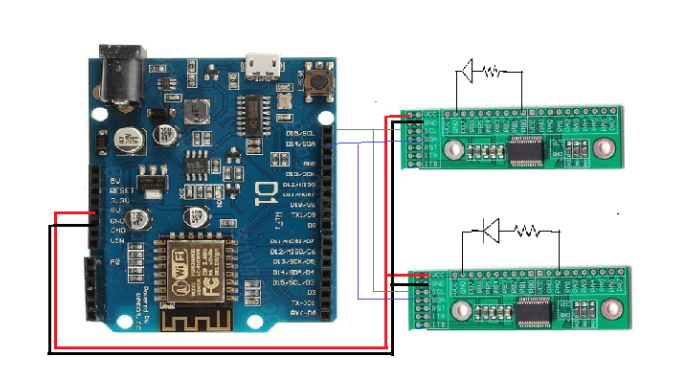
Connect the SCL and SDA pin of mcp23017 to the SCL and SDA pin of arduino respectively. Connect the VCC and GND pins of mcp23017 to 5V and GND of arduino.Also connect the one led on one mcp23017 and one on another.
For code :-
Also read
- Gas sensor interface with Arduino
- Androids Apps controlled Robot using Arduino
- Moisture Sensor interface with Arduino
Demo video






0 Comments
Be the first to comment!
Leave a Comment